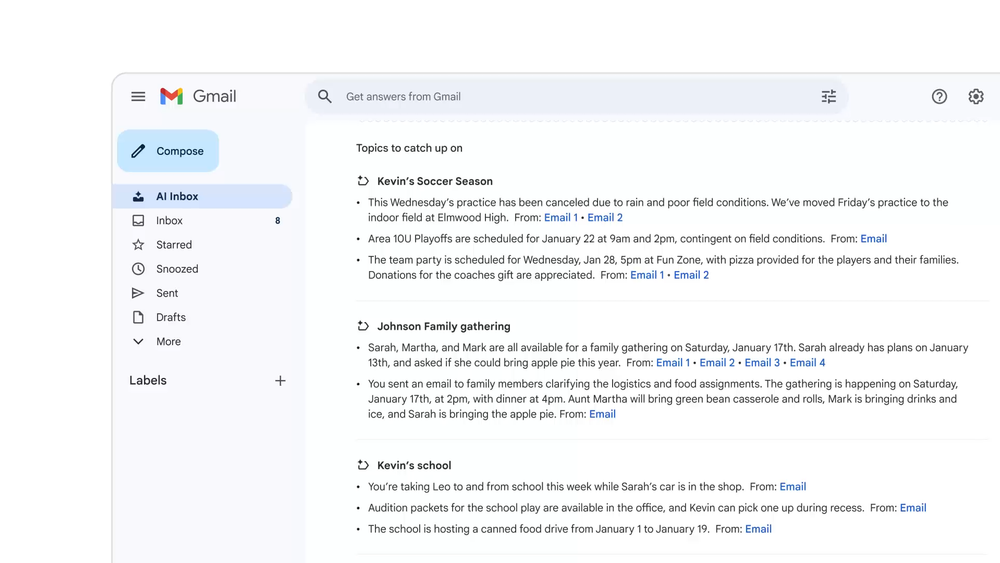
Ask your inbox anything to get summaries, drafts, & more
Gmail in the Gemini Era represents Google's major AI-powered overhaul of Gmail, announced on January 8, 2026, integrating Gemini 3 and Personal Intelligence to transform how users manage their inboxes. The platform introduces AI Overviews for thread summaries, inbox-wide Q&A capabilities, enhanced Help Me Write features, and a revolutionary AI Inbox view that reshapes email around summaries, topics, and to-dos rather than individual messages. Powered by Gemini 3, these features help users instantly summarize lengthy conversations, ask questions across their entire email history, and draft polished emails with advanced grammar and style checking. Google emphasizes that personal Workspace content is not used to train AI models, ensuring user privacy while delivering powerful AI assistance.
Gmail's new Gemini-powered features integrate seamlessly into your existing Gmail workflow, providing AI assistance without requiring separate apps or complex setup.
Using AI Overviews for Thread Summaries:
Asking Your Inbox Questions:
Using Help Me Write:
Accessing AI Inbox:
AI Overviews for Thread Summaries Automatically synthesizes lengthy email conversations into concise summaries of key points, available to all users at no cost.
Inbox-Wide Q&A with Gemini Ask natural language questions to search your entire email history and receive instant AI-generated answers with context.
Enhanced Help Me Write Draft emails from scratch or polish existing text with AI assistance, with upcoming personalization using context from other Google apps.
Suggested Replies with Context One-click response suggestions that match your writing style and conversation context, evolved from Smart Replies.
Advanced Proofread Get sophisticated grammar, tone, and style checks before sending to ensure professional, polished communications.
AI Inbox View Revolutionary inbox organization that reshapes email around summaries, topics, and to-dos instead of individual messages.
Privacy-First AI Processing All features powered by Gemini 3 with Google's guarantee that personal Workspace content is never used to train AI models.
#1 Business Professionals Managing High Email Volume Perfect for executives and managers who receive hundreds of emails daily and need to quickly understand long conversation threads without reading every reply.
#2 Customer Service & Support Teams Ideal for support teams handling complex customer inquiries, enabling them to instantly summarize ticket history and craft professional, polished responses with AI assistance.
#3 Project Managers & Team Coordinators Great for tracking multiple projects and conversations, using inbox Q&A to instantly find specific information like vendor quotes, meeting decisions, or team commitments.
#4 Freelancers & Consultants Essential for professionals juggling multiple clients, helping them retrieve client communications quickly and draft personalized, professional emails efficiently.
#5 Small Business Owners Valuable for entrepreneurs managing all aspects of their business, from finding old invoices to drafting marketing emails with proper grammar and style.
#6 Students & Researchers Useful for academic users managing communications with professors, collaborators, and research contacts, with Q&A helping locate specific references or discussions.
Are Gmail's Gemini features free to use? AI Overviews for thread summaries and Help Me Write are available to all Gmail users at no cost starting January 2026. However, inbox-wide Q&A with AI Overviews requires a Google AI Pro or Ultra subscription.
Which Gmail features are powered by Gemini 3? All the new AI features announced in January 2026 are powered by Gemini 3, including AI Overviews, Help Me Write, Suggested Replies, Proofread, and the upcoming AI Inbox view.
Is my email data used to train Google's AI models? No. Google explicitly states that your personal Workspace content is not used to train its AI models, ensuring privacy while providing AI assistance.
When will AI Inbox be available to everyone? AI Inbox is currently rolling out first to Trusted Testers, with broader availability planned for the coming months in 2026.
Do I need to opt-in to use these features? Some features are automatically available in Gmail, while inbox-wide Q&A requires a Google AI Pro or Ultra subscription. Users can choose to opt out of AI features if preferred.