
Friendware
Tab-to-complete everywhere on MacOS
UpdatedJan 23, 2026
What is Friendware?
How to use Friendware?
Features
Use Cases
FAQ
Pricing
Founding Member (Lifetime Access)
Free
Subscription Plans (Coming Soon)
Free
Free Trial
Free
Tab-to-complete everywhere on MacOS
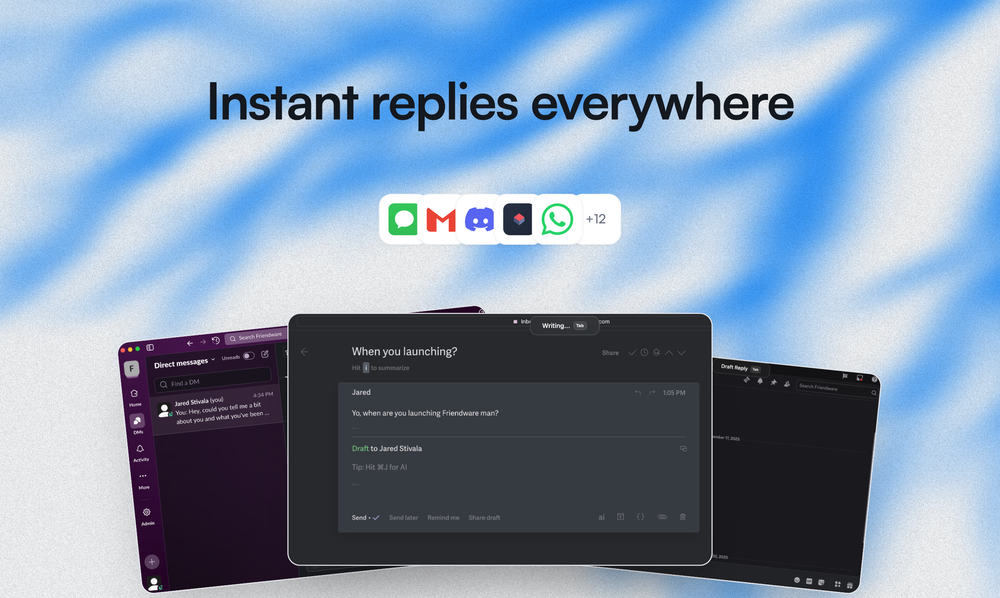
Friendware is a native macOS copilot that brings AI-powered writing assistance directly to your desktop with a simple press of the Tab key. Unlike traditional AI writing tools that require switching between apps or copy-pasting, Friendware seamlessly integrates into your existing workflow by working in any application on your Mac. It understands the context of what's on your screen, analyzes your writing style and tone, and provides personalized suggestions that sound authentically like you. Whether you're composing emails, chatting on Slack, posting on social media, or writing documents, Friendware acts as your intelligent writing companion that learns your unique voice and adapts to different communication scenarios in real-time.
Install Friendware on your Mac: Download and install the native macOS application from Friendware.ai to get started with the copilot.
Press the Tab key when writing: While composing text in any application (email, Slack, social media, documents), simply press Tab to activate Friendware's AI suggestions.
Let Friendware analyze the context: The AI will automatically parse what's on your screen, understanding who you're communicating with and the conversation context without requiring you to re-explain.
Review and select from personalized suggestions: Friendware will present multiple completion options that match your writing style and tone for that specific recipient or situation.
Accept the suggestion or continue writing: Choose the suggestion that fits best, or continue typing to refine the context and get new suggestions with each Tab press.
Universal Application Support - Works seamlessly in almost any app on your Mac including email clients, Slack, social media platforms, and document editors without requiring switching or copy-pasting.
Personalized Tone Adaptation - Learns how you communicate with different people and automatically adjusts suggestions to match whether you're casual with friends or formal with colleagues.
Screen-Aware Context Parsing - Analyzes on-screen text as the primary input to understand conversation context and reduce the need for re-explaining what you're trying to say.
Instant Response Generation - Dramatically reduces writing time from approximately 45 seconds to just over 4 seconds per message with intelligent Tab-triggered suggestions.
Native macOS Integration - Built specifically for Mac users with a lightweight, native application that works system-wide across all your favorite productivity apps.
Privacy-First Design - Processes your writing context locally on your device to provide personalized suggestions while maintaining your data privacy and security.
Real-Time Intent Prediction - Understands not just what you've written but what you're trying to accomplish, predicting your intent and executing suggestions in real-time.
#1 Email Productivity - Compose professional and personal emails faster by letting Friendware suggest complete responses based on the email thread context and your typical communication style.
#2 Team Communication - Speed up Slack and messaging conversations by getting instant, contextually appropriate suggestions that match how you talk to different teammates and channels.
#3 Social Media Management - Create engaging social media posts and responses across platforms with AI assistance that maintains your authentic voice and brand tone.
#4 Customer Support - Respond to customer inquiries more efficiently with personalized reply suggestions that understand the customer's question and your company's communication style.
#5 Document Writing - Accelerate writing reports, proposals, and documentation by getting intelligent paragraph and sentence completions that maintain consistency with your writing style.
#6 Content Creation - Overcome writer's block and maintain your creative flow when writing blog posts, articles, or marketing copy with contextual suggestions that sound like you.
What is Friendware and how does it work? Friendware is a native macOS copilot that provides AI-powered writing suggestions by pressing the Tab key in any application. It analyzes what's on your screen, understands the context, learns your writing style, and offers personalized text completions that sound authentically like you.
Which applications does Friendware support? Friendware works in almost any app on your Mac, including email clients, messaging apps like Slack, social media platforms, document editors, and more. It's designed to integrate seamlessly into your existing workflow without requiring you to switch apps or copy-paste content.
How does Friendware personalize suggestions to my writing style? Friendware learns how you communicate with different people by analyzing your writing patterns. It picks up on whether you're casual with friends or formal with coworkers and adjusts its suggestions accordingly. The more you use it, the better it becomes at matching your unique voice.
Is my data private when using Friendware? Yes, Friendware is built with privacy in mind. It processes your writing context locally on your device to provide personalized suggestions while maintaining your data privacy and security.
What are the current limitations of Friendware? During the founding cohort, lifetime licenses are single-device only, which may be limiting for multi-Mac users. Additionally, the current focus is on text context, so visual-heavy workflows involving screenshots or diagrams are less supported at this time.