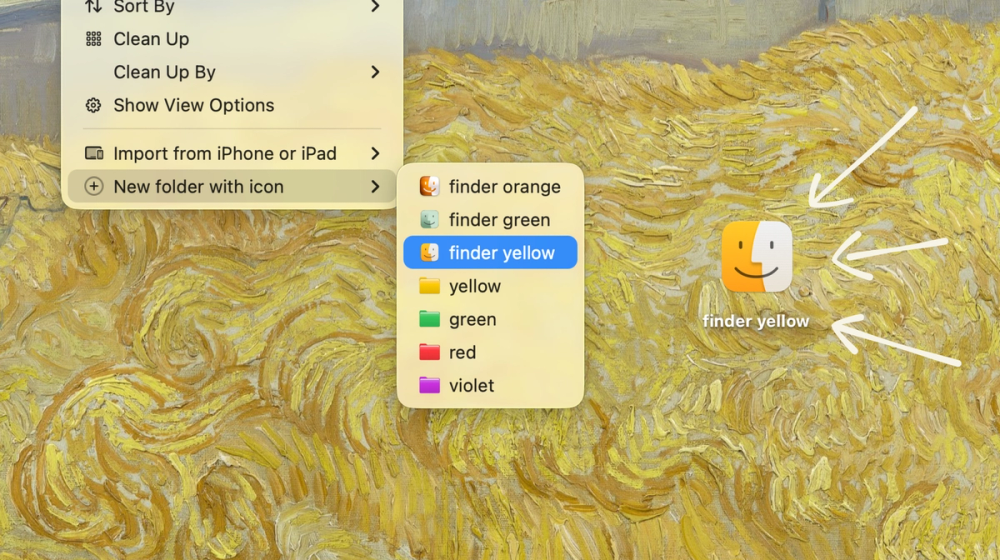
A Finder extension to create folders with custom icons
Foldr is a lightweight Finder extension for macOS that lets you customize folder icons directly from the context menu. It transforms the mundane experience of navigating identical-looking folders into a visually organized workspace with personalized icons. Built natively with SwiftUI, Foldr offers 6 built-in color options plus support for custom .icns files, making it easy to create a color-coded or icon-based folder system that suits your workflow.
Foldr integrates seamlessly into the macOS Finder, adding custom folder creation and icon modification options to your right-click context menu.
Getting Started:
Custom Folder Creation Create new folders with custom icons directly from the Finder context menu with a single right-click.
Icon Modification Change any existing folder's icon to a custom option without leaving Finder.
6 Built-in Colors Choose from six pre-designed color options for quick folder organization.
Custom .icns Support Import your own .icns icon files to create a completely personalized folder system.
Native SwiftUI Design Built with SwiftUI for seamless integration with macOS Finder and optimal performance.
Context Menu Integration Access all features directly from the right-click menu without switching applications.
#1 Project Organization Perfect for developers and designers who manage multiple projects and need visual differentiation between project folders.
#2 Personal File Management Ideal for users who want to organize personal files like photos, documents, and downloads with intuitive color-coded folders.
#3 Team Collaboration Great for teams using shared drives who need consistent folder identification across workstations.
#4 Creative Workflows Essential for creative professionals managing assets, client files, and deliverables with custom branded folder icons.
#5 Student Organization Helpful for students organizing coursework, research materials, and assignments by subject or semester.
Does Foldr require administrator permissions? Foldr requires enabling the Finder extension in System Preferences, which may prompt for permissions, but the app itself runs with standard user privileges.
Can I use my own custom icons? Yes, Foldr supports custom .icns files, allowing you to import and use any icon that matches the macOS icon format.
Does Foldr work with external drives? Yes, Foldr works with any folder accessible through Finder, including external drives and network shares.
Is there a free trial available? Yes, Foldr offers a free trial so you can test the features before purchasing the full version for $3.
Will my custom folder icons sync across devices? Custom icons are applied at the folder level in macOS. They will sync if you use a cloud service like iCloud Drive or Dropbox that preserves folder metadata.