LogoHelloAITools
  • Categories
  • Collection
  • Blog
  • Pricing
  • Submit
LogoHelloAITools
  1. Home
  2. Products
  3. Flakes
Flakes

Flakes

A keyboard-first, AI-powered native browser for macOS.

UpdatedJan 8, 2026
URLflakes.ai
PricingFree
AI ProductivityAI Search#Free#Desktop App#For Developers#AI Agent#New
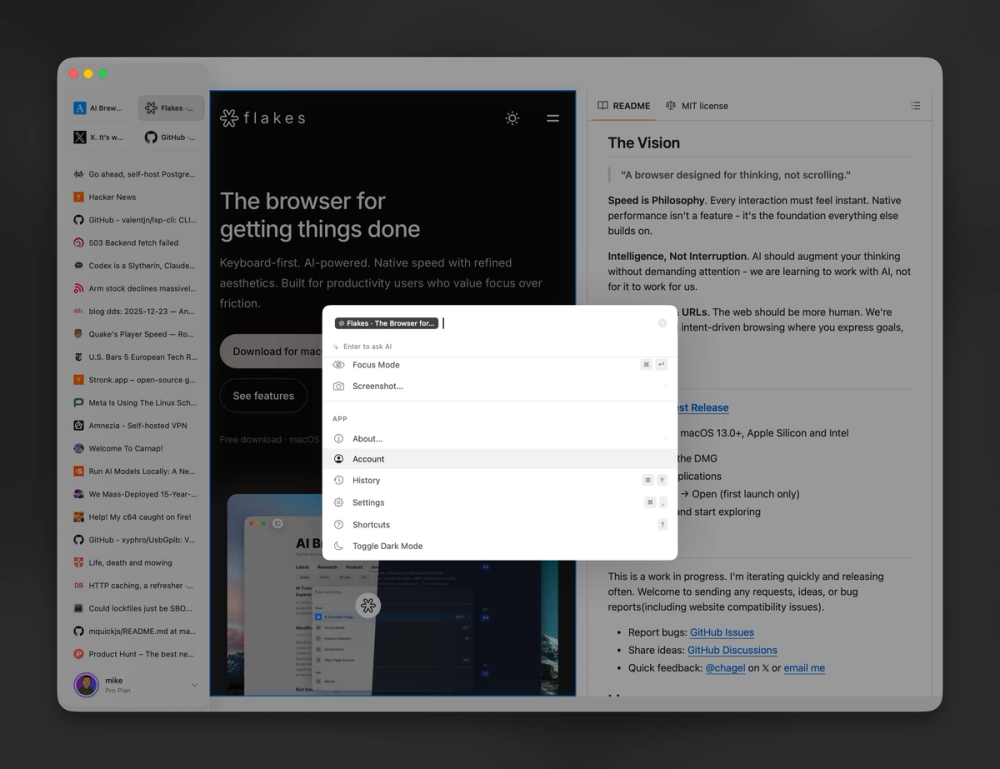
Screenshot of Flakes
Visit Website

What is Flakes?

How to use Flakes?

Features

Use Cases

FAQ

Pricing

Free

$0
  • Full browser functionality
  • Vim-style keyboard navigation
  • Command palette access
  • Drift AI assistant
  • Focus mode
  • Built-in ad blocking
  • Private browsing mode
LogoHelloAITools

Discover the best AI tools for your needs.

Product
  • Browse All
  • Collection
Resources
  • Blog
  • Pricing
  • Submit
Company
  • Privacy Policy
  • Terms of Service
  • Sitemap
Copyright © 2026 All Rights Reserved.

Flakes is a keyboard-first, AI-powered native browser designed exclusively for macOS. It combines Vim-style navigation with an embedded AI assistant called Drift AI that understands your open tabs and helps you stay focused. Built with SwiftUI and WebKit, Flakes strips away visual clutter to create a distraction-free browsing experience optimized for deep work and productivity.

  1. Download Flakes from the official website for macOS (requires macOS 14+)
  2. Launch the app and press Cmd+K to access the command palette for all actions
  3. Use Vim-style navigation (h, j, k, l keys) to scroll and navigate pages
  4. Press "f" to show link hints and click any link without using your mouse
  5. Press Cmd+Enter to activate Focus Mode and hide all UI elements except content
  6. Interact with Drift AI to ask questions about your open tabs, summarize content, or translate pages
  • Command Palette (Cmd+K): Access everything from a single shortcut - search history, run commands, open URLs, and query the AI assistant
  • Vim-Style Navigation: Use h/j/k/l keys to navigate, press "f" for link hints, and manage windows entirely from your keyboard
  • Drift AI Assistant: Built-in AI that reads your open tabs to provide direct answers, real-time translation, and deep conversations about viewed content
  • Focus Mode: Press Cmd+Enter to hide toolbars and address bars, leaving only the content you need to focus on
  • Native Performance: Built with SwiftUI and WebKit for fast cold starts, smooth scrolling, and minimal resource usage
  • Privacy-First Design: Local browser with ad blocking by default, optional AI features, and isolated private mode that leaves no history

#1 Developer Documentation Research: Software developers can browse API docs, logs, and technical documentation while using Drift AI to get instant clarifications without leaving the browser

#2 Academic Research and Writing: Researchers and students can manage multiple research tabs while using the AI to summarize complex papers and clarify difficult concepts

#3 Distraction-Free Content Consumption: Writers and content consumers can use Focus Mode with built-in ad blocking to read articles and documents without visual distractions

#4 Technical Support and Documentation Review: Support teams can quickly scan documentation and use AI assistance to find answers for customer queries more efficiently

Is Flakes available for Windows or Linux? No, Flakes is currently macOS-only and requires macOS 14 (Sonoma) or later. There are no announced plans for Windows or Linux support.

What AI powers Drift AI? Drift AI is the built-in AI assistant that reads your open tabs. The specific underlying AI models are not publicly documented, but all AI features are optional and privacy-conscious.

Does Flakes support browser extensions? Flakes has a limited extension ecosystem compared to Chromium-based browsers like Chrome or Edge. It prioritizes native performance and simplicity over extensive customization.

Is Flakes free to use? Yes, Flakes is currently offered as a free macOS app download with no announced paid tiers.