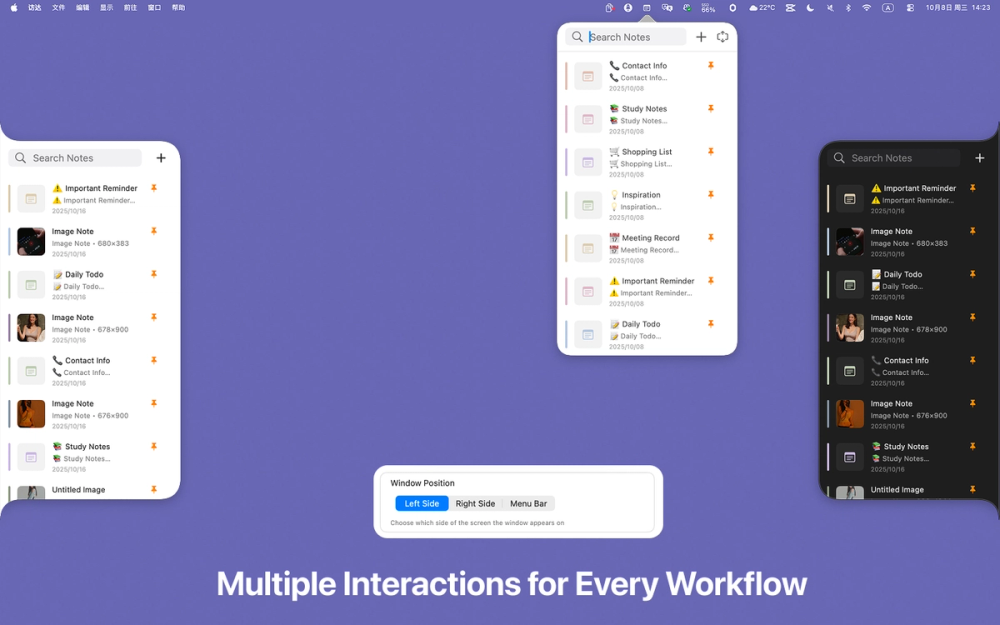
Lightweight Desktop Notes
Enote is a lightweight and efficient sticky notes application designed for capturing ideas instantly and organizing thoughts directly on your desktop. Available across Mac, iPhone, iPad, and Apple Vision devices, it provides a seamless note-taking experience with powerful features like global shortcuts, image support, and Markdown formatting. Whether you are a student, professional, designer, or developer who values speed and simplicity, Enote helps you stay organized without disrupting your workflow.
#1 Quick Idea Capture: Instantly jot down thoughts, ideas, or inspiration using global shortcuts without leaving your current application
#2 Study Notes: Students can create organized study notes with Markdown formatting and keep important information visible with floating windows
#3 Meeting Reminders: Pin important meeting notes or agendas on your desktop to stay prepared and focused throughout the day
#4 Design References: Designers can paste images and visual references directly into notes for quick access during creative work
#5 Developer Documentation: Developers can store code snippets, commands, and technical notes with Markdown formatting for easy reference
What platforms does Enote support? Enote is available on iPhone (iOS 17.1+), iPad (iPadOS 17.1+), Mac (macOS 13.5+), and Apple Vision (visionOS 1.0+) with Universal Purchase support.
Is Enote free to use? Yes, Enote offers a free version with core features. Premium subscriptions are available at .99/month or .99/year for additional functionality.
Does Enote collect my data? No, the developer indicates that no data is collected from the application, ensuring your notes remain private.
Can I use Markdown in my notes? Yes, Enote fully supports Markdown syntax, allowing you to format your notes with headers, lists, bold text, and more.
How do I keep a note always visible? Use the floating window feature to pin important notes on top of other windows while you work on other tasks.