LogoHelloAITools
  • Categories
  • Collection
  • Blog
  • Pricing
  • Submit
LogoHelloAITools
  1. Home
  2. Products
  3. AI Image
  4. Camera M 9
Camera M 9

Camera M 9

Pro manual camera app for iPhone and iPad

UpdatedJan 6, 2026
URLapps.apple.com
PricingPaid
AI Image#Mobile App#Paid#For Content Creators
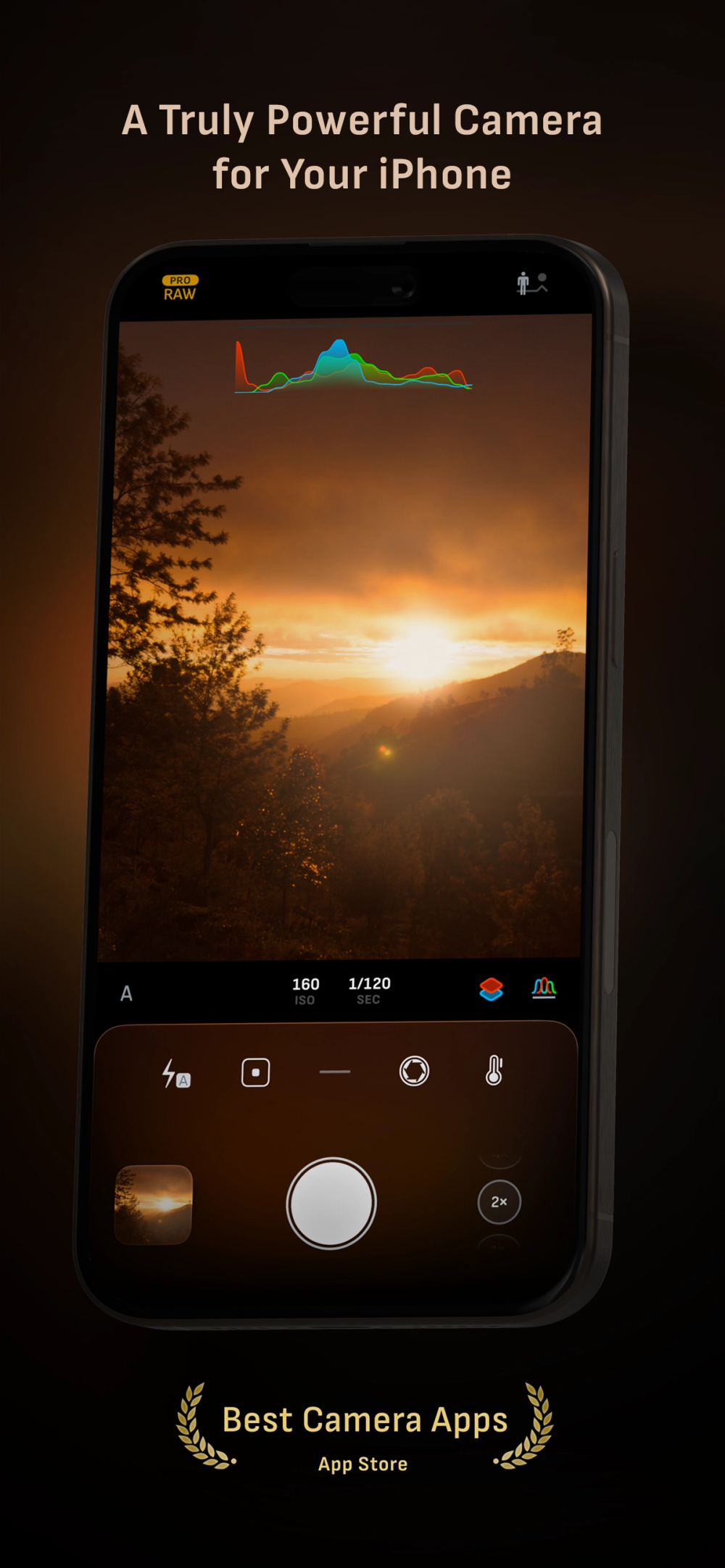
Screenshot of Camera M 9

What is Camera M 9?

How to use Camera M 9?

Features

Use Cases

FAQ

Pricing

Camera M

$7.99
  • One-time purchase
  • All features included
  • No subscriptions or in-app purchases
  • Family Sharing enabled (up to 6 family members)
  • Free updates
LogoHelloAITools

Discover the best AI tools for your needs.

Product
  • Browse All
  • Collection
Resources
  • Blog
  • Pricing
  • Submit
Company
  • Privacy Policy
  • Terms of Service
  • Sitemap
Copyright © 2026 All Rights Reserved.
Visit Website

Camera M is a professional manual camera app for iPhone and iPad that provides DSLR-like controls for capturing high-quality photos. Developed by a two-person team and frequently featured on the App Store since 2017, it offers comprehensive manual controls for focus, exposure, ISO, and white balance. The app supports multiple image formats including Apple ProRAW, RAW, HEIF, JPEG, TIFF, and PNG, making it an essential tool for serious mobile photographers who want precise control over their captures.

  1. Download Camera M from the App Store for $7.99 and launch the app on your iPhone or iPad.
  2. Use the gesture-based controls to adjust manual settings including focus, ISO, exposure duration, and white balance.
  3. Select your preferred image format (ProRAW, RAW, HEIF, JPEG, TIFF, or PNG) based on your editing needs.
  4. Choose a shooting mode such as Single, Burst, Timer, Depth, Live Photo, or Bracket for different scenarios.
  5. Enable focus peaking and the 4x magnifier loupe to achieve perfect manual focus.
  6. Use the live RGB histogram and highlight/shadow alerts to nail your exposure.
  7. Capture your photo and access your images directly in the built-in photo library with full EXIF metadata display.
  • Manual Camera Controls: Precise adjustment of focus, ISO, exposure duration, and white balance with gesture-based interface and fine-tuning feature.
  • Multiple Image Formats: Support for Apple ProRAW, RAW, HEIF, JPEG, TIFF, and PNG with optional minimum compression.
  • Focus Peaking & 4x Magnifier: Liquid Glass loupe with smooth panning and haptic feedback for achieving perfect manual focus.
  • Live RGB Histogram: Real-time RGB and RGB luminance histograms with highlight and shadow alerts for precise exposure control.
  • Shooting Modes: Single, Burst, Timer, Depth, Dual/Triple Photo, Live Photo, and Bracket modes for versatile photography.
  • Max Image Processing: Deep Fusion and Smart HDR support for better noise reduction and image stabilization.
  • Apple Watch Support: Remote shutter control and sunrise/sunset Golden Hour display with sun position indicator.

#1 Professional Mobile Photography: Use Camera M for serious photography work when you need DSLR-like manual controls on your iPhone, with RAW capture for maximum editing flexibility.

#2 Macro Photography: Take advantage of the minimum focus distance display and 4x magnifier loupe to capture stunning close-up shots with precise focus control.

#3 Low Light Photography: Manually adjust ISO and exposure duration with the semi-priority modes to capture quality images in challenging lighting conditions.

#4 Exposure Bracketing: Use Bracket mode to capture multiple exposures for HDR merging or to ensure you get the perfect exposure in high-contrast scenes.

#5 Content Creation: Professional content creators can use the app to maintain consistent quality and white balance across their mobile photo shoots.

Does Camera M support Apple ProRAW? Yes, Camera M supports Apple ProRAW capture on iPhone 12 Pro and later models, along with standard RAW, HEIF, JPEG, TIFF, and PNG formats.

Is Camera M compatible with my iPhone? Camera M requires iOS 16 or later. Some features like Depth capture require iPhone X or later, and ProRAW requires iPhone 12 Pro or later. Visit camera-m.com/compatibility for detailed device support.

Can I control Camera M with Apple Watch? Yes, Camera M includes Apple Watch support with shutter button control and sunrise, sunset, and Golden Hour display with sun position indicator.

Does the app support Camera Control on newer iPhones? Yes, Camera M supports Camera Control for manual focus, ISO, exposure duration, and white balance adjustments on compatible devices.

Is there a subscription or in-app purchases? No, Camera M is a one-time purchase of $7.99 with no subscriptions or in-app purchases required.