LogoHelloAITools
  • Categories
  • Collection
  • Blog
  • Pricing
  • Submit
LogoHelloAITools
  1. Home
  2. Products
  3. BrainLoom
BrainLoom

BrainLoom

Turn PDFs into Flashcards. The local-first Learning OS.

UpdatedJan 24, 2026
URLbrainloom.app
PricingFree & Paid
AI ProductivityAI EducationAI Research#Desktop App#For Students#Freemium#No-code#New
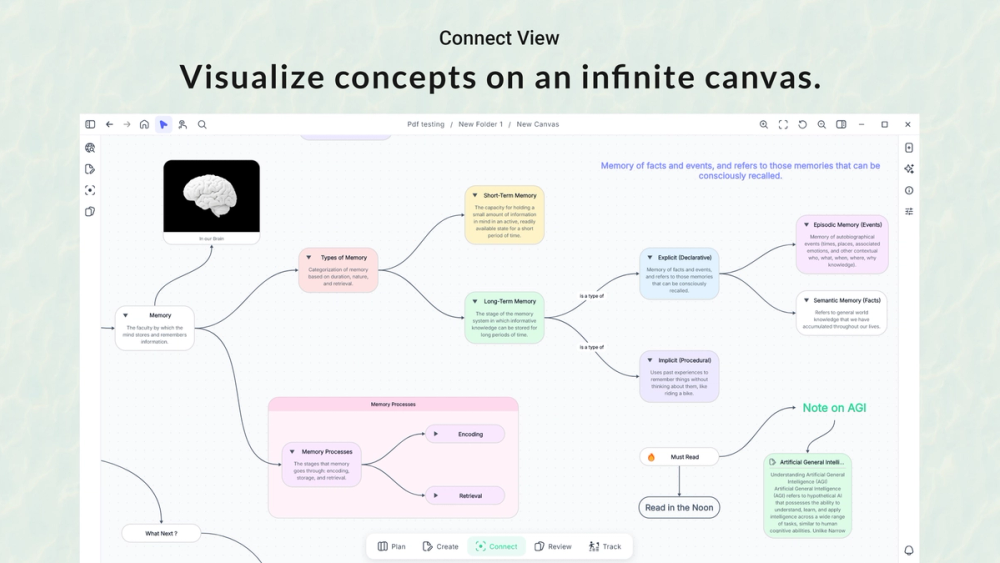
Screenshot of BrainLoom
Visit Website

What is BrainLoom?

How to use BrainLoom?

Features

Use Cases

FAQ

Pricing

Starter Edition

Free
  • Unlimited notes creation
  • Core workspace features
  • Local-first data storage
  • No credit card required

Founder's Club (Phase 1)

$29 One-Time
  • Lifetime license for BrainLoom V1.X
  • Flash-Loom Protocol (instant flashcard creation)
  • Unlimited FSRS spaced repetition review
  • Full canvas interactivity and mind mapping
  • AI Chatbar and context features
  • Native Anki importer
  • Founder's voting rights on roadmap
  • 14-day money-back guarantee
  • Limited to first 150 users

Early Adopter (Phase 2)

$49 One-Time
  • All Founder's Club features
  • Lifetime license
  • Available for users 151-500

Public SaaS (Phase 3)

$48/Year
  • All features included
  • Subscription model for users after 500
  • Expected late 2026
LogoHelloAITools

Discover the best AI tools for your needs.

Product
  • Browse All
  • Collection
Resources
  • Blog
  • Pricing
  • Submit
Company
  • Privacy Policy
  • Terms of Service
  • Sitemap
Copyright © 2026 All Rights Reserved.

BrainLoom is a local-first Learning OS that transforms the way you study by combining PDF reading, note-taking, and spaced repetition flashcards in one unified workspace. It eliminates the need to switch between multiple apps like PDFs, Notion, and Anki by allowing you to highlight any text and instantly convert it into flashcards with Q&A, multiple choice, or cloze deletion formats. The platform features AI-powered research assistance that maps semantic connections between your notes, a visual canvas for mind-mapping, and built-in FSRS (Free Spaced Repetition Scheduler) algorithm for optimal memory retention. Available as a desktop application for macOS, Windows, and Linux with both free and paid lifetime license options.

  1. Download BrainLoom Starter (free) from the official website for your operating system (macOS, Windows, or Linux)
  2. Import your existing study materials - PDFs, notes, or even Anki decks using the native importer
  3. Open a PDF or create notes in the workspace and highlight any text you want to memorize
  4. BrainLoom automatically generates flashcards (Q&A, MCQ, or Cloze) from your highlights without leaving the app
  5. Use the visual canvas to organize your notes spatially, drag notes to create mind maps and connect related ideas
  6. Review your flashcards using the built-in FSRS spaced repetition system to optimize long-term memory
  7. Use the "Time Travel" feature to instantly jump back to the original source when reviewing cards for context
  8. Chat with your library using the AI Chatbar to generate insights and discover hidden connections in your notes
  • Flash-Loom Protocol: Instantly create flashcards from PDFs and notes without context switching - supports Q&A, MCQ, and Cloze deletion formats
  • Time Travel Context Retrieval: One-click jump back to the exact paragraph in your original PDF where you created each flashcard, never losing context
  • FSRS Spaced Repetition Engine: Built-in scientifically-proven algorithm that schedules reviews at optimal intervals to maximize long-term memory retention
  • Visual Canvas Mind Mapping: Drag notes onto a spatial canvas to create interconnected mind maps while maintaining live editing within nodes
  • AI Semantic Connection Mapping: AI assistant that analyzes your notes and automatically draws connections, discovering hidden patterns in your research
  • Smart Paste Intelligence: Context-aware clipboard that automatically formats pasted content - builds nodes, updates titles, or fills descriptions based on where you paste
  • Native Anki Importer: Transfer existing Anki decks in seconds with zero data loss, making migration seamless
  • BYOK AI Integration: Bring Your Own Key model for privacy-first AI features, keeping your data secure while leveraging AI capabilities

#1 Medical and Law Students: Tackle dense textbooks and complex terminology by converting PDF lectures and readings into spaced repetition flashcards. The Time Travel feature helps recall exactly where concepts were introduced when reviewing months later.

#2 Academic Researchers: Organize literature reviews and research papers on the visual canvas, letting AI discover connections between sources you might have missed. Chat with your library to synthesize insights across multiple papers.

#3 Professional Certification Prep: Study for certifications like CPA, PMP, or AWS exams by importing study guides and creating structured flashcard decks with progress tracking to ensure complete coverage before exam day.

#4 Language Learners: Build vocabulary decks from reading materials in your target language, with context preservation so you always remember where you encountered each word or phrase.

#5 Lifelong Learners and Autodidacts: Maintain a personal knowledge base from books, courses, and articles. Archive mastered knowledge while keeping active learning focused on new material without subscription fatigue.

What platforms does BrainLoom support? BrainLoom is available as a native desktop application for macOS, Windows, and Linux. It runs locally on your device, ensuring your data stays private and accessible offline.

Can I import my existing Anki decks? Yes, BrainLoom includes a native Anki importer that transfers your existing decks in seconds with zero data loss, making it easy to migrate your study materials.

Is there a free version available? Yes, the BrainLoom Starter Edition is completely free with no credit card required. You can create unlimited notes and experience the core workspace features, then upgrade to the paid version for advanced features like FSRS review and AI capabilities.

What happens after the Founder's Club closes? After the first 500 lifetime licenses are sold, BrainLoom will transition to a subscription model ($48/year). Founder's Club members keep lifetime access and never pay subscriptions.

How does the AI feature protect my privacy? BrainLoom uses a BYOK (Bring Your Own Key) model, meaning you provide your own API key for AI features. Your data is processed through your own account, not stored on BrainLoom servers.