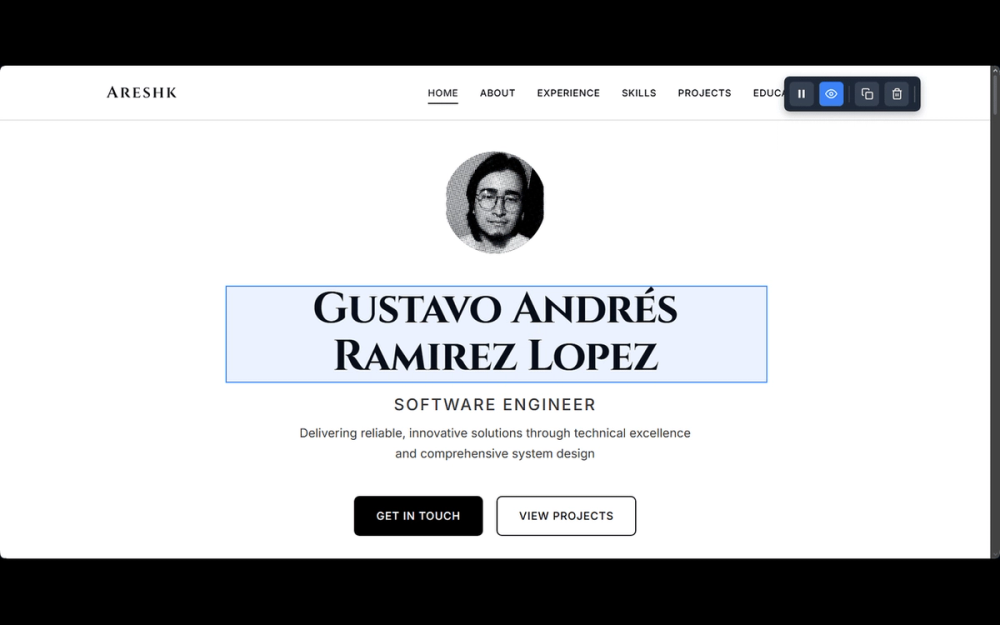
Annotate any webpage UI and export feedback as Markdown
AgentEcho is a visual feedback annotation tool designed specifically for developers to streamline communication with AI coding assistants. This Chrome extension allows you to place numbered markers on any DOM element of a webpage and generate AI-optimized Markdown feedback reports. Built with TypeScript and modern web standards, AgentEcho uses Shadow DOM isolation to ensure it works seamlessly on any website without interfering with page styles. It's the perfect bridge between visual bug reporting and AI-powered code assistance.
Getting started with AgentEcho is straightforward and requires just a few simple steps.
1. Install the Extension - You can either purchase AgentEcho from the Chrome Web Store for $1 to support development, or build it from source for free by cloning the repository and running npm install followed by npm run build.
2. Activate Annotation Mode - Click the AgentEcho extension icon in your browser toolbar to open the popup, then click the "Activate" button to enable annotation on the current page.
3. Select and Mark Elements - Hover over any element on the page to see a blue highlight box indicating what you're targeting. Click on the element to place a numbered marker and enter your feedback in the modal that appears.
4. Add Multiple Annotations - Repeat the process for as many elements as you need to annotate. All markers remain visible and positioned on the page for easy reference.
5. Export Your Feedback - Click the "Copy" button in the toolbar or press the "C" key to copy all your feedback as a structured Markdown report, ready to paste into any AI coding assistant.
Visual Annotation System - Click any webpage element to place numbered markers with custom feedback. Blue hover highlights show exactly what you're targeting, and markers stay visible and properly positioned on the page.
Framework Detection - Automatically detects and identifies React and Angular components in your feedback reports, with Vue and Svelte support planned for future releases.
Smart Element Analysis - Generates unique, stable CSS selectors and extracts classes, IDs, data attributes, text content, and component names for precise element identification.
Markdown Export - One-click copy to clipboard generates structured reports optimized specifically for AI coding agents, including all element context needed for precise communication.
Shadow DOM Isolation - Uses Shadow DOM technology to ensure the extension never breaks page styles and works flawlessly on any website.
Keyboard Shortcuts - Power user shortcuts include C for copy, H for toggle visibility, Delete/Backspace for clear all, and Escape or Ctrl+Shift+A to exit annotation mode.
Per-Page Persistence - Your feedback and markers are saved per page, allowing you to continue where you left off when revisiting a site.
#1 Code Review Communication - When reviewing frontend code, use AgentEcho to visually mark UI elements that need changes and generate detailed reports for developers, including exact CSS selectors and component names.
#2 Bug Reporting - Streamline bug reporting by placing markers on problematic elements and generating structured feedback that includes all the technical details AI assistants and developers need to locate and fix issues.
#3 AI Coding Assistant Integration - Copy your annotated feedback directly into AI coding assistants like Claude, ChatGPT, or Cursor to provide precise visual context about which elements need modification.
#4 Design Feedback - Designers and developers can collaborate more effectively by using visual markers to indicate spacing issues, alignment problems, or style inconsistencies with specific element references.
#5 Accessibility Audits - Mark elements that need accessibility improvements and generate reports with exact selectors, making it easy to track and address a11y issues across your web application.
#6 Documentation and Training - Create annotated walkthroughs of web interfaces by marking key elements and describing their functionality for onboarding new team members or creating documentation.
Is AgentEcho free to use? - Yes, AgentEcho is free to build and use from source. You can clone the GitHub repository and build it yourself. Alternatively, you can purchase it for $1 on the Chrome Web Store to support continued development and get a convenient pre-built installation.
Which browsers does AgentEcho support? - AgentEcho is currently available as a Chrome extension built with Manifest V3. It works in Chrome and other Chromium-based browsers like Edge and Brave.
Does AgentEcho work with React and other frameworks? - Yes, AgentEcho automatically detects React and Angular components and includes component names in the generated reports. Vue and Svelte support is planned for future releases.
Will AgentEcho affect the styling of the website I'm annotating? - No, AgentEcho uses Shadow DOM isolation to ensure its visual elements never interfere with or break the styles of the page you're working on.
Can I use AgentEcho for commercial purposes? - AgentEcho uses the Polyform Noncommercial 1.0.0 license. You can use it for personal or internal business purposes, but you cannot distribute it commercially or sell derivatives.