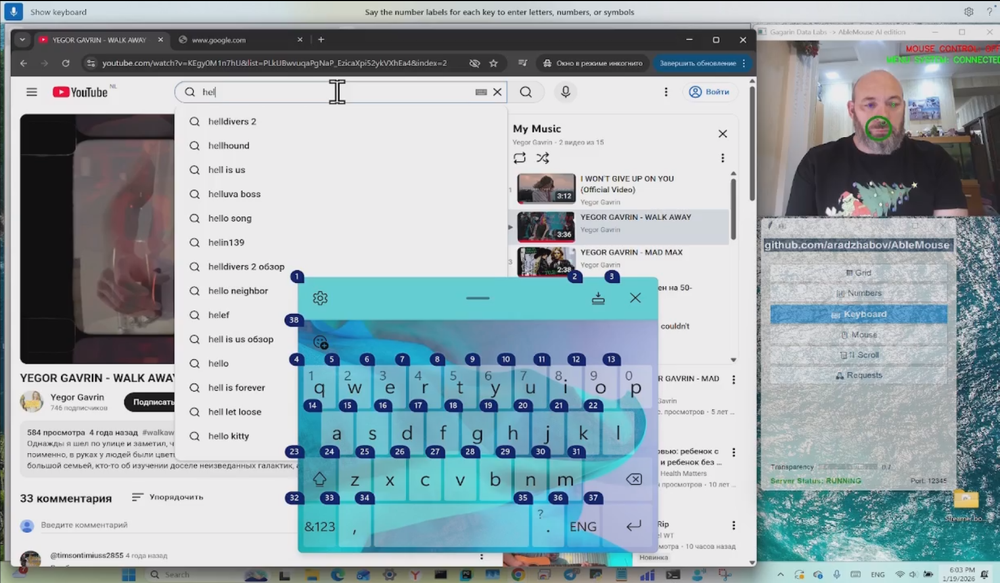
AbleMouse Beyond Switch Edition is an open-source accessibility software designed for individuals with severe physical disabilities who have extremely limited mobility. It provides computer control through minimal physical movements - even a single micro-gesture like slightly opening one's mouth can be used to navigate the entire PC. This innovative solution serves as an affordable alternative to expensive assistive technologies like MouthPad, eye-trackers, or complex systems like Neuralink. The software empowers people with conditions such as ALS, cerebral palsy, spinal cord injuries, and muscular dystrophy to regain digital independence and reconnect with the online world.
Getting started with AbleMouse Beyond Switch Edition requires a Windows computer with a webcam and some technical setup. The system uses a hierarchical menu that cycles through items, allowing users to select commands with their available micro-movement.
1. Install Python Environment - Set up Python 3.9-3.12 with a virtual environment and install required packages including pygame.
2. Configure the Application - Edit app_config.py to set server parameters and adjust the highlight_interval to match the user's reaction time needs.
3. Install VB-CABLE Driver - Download and install the VB-CABLE Virtual Audio Device driver from vb-audio for audio routing functionality.
4. Set Up Windows Voice Access - Enable and configure Windows Accessibility Speech (Voice Access) which executes the voice commands generated by the system.
5. Launch the System - Start the server (main.py), then start the client (able_mouse_ai_edition.py), and begin your session by clicking on the application window.
Hierarchical Menu System - A cyclically rotating menu that displays commands one by one, allowing users to select options with a single micro-movement when the desired command appears.
Universal Sensor Support - While the default uses webcam-based computer vision to detect mouth micro-movements, the architecture accepts any input signal via TCP protocol, making it adaptable to various sensors and physical capabilities.
Multi-Language Interface - Fully customizable interface that can be translated into any language, with built-in bypass for Windows language input limitations so users see their native language while the system correctly interprets commands.
Customizable Menu Structure - The server component enables building menus of any complexity tailored to specific tasks and individual physical abilities through the menu_config.py configuration file.
Voice Control for Non-Speakers - Enables Windows voice control functionality even for individuals who cannot speak, creating a complete computer interaction interface for those with extreme physical limitations.
Open Source & MIT Licensed - Completely free and open source under the MIT license, allowing community contributions, modifications, and improvements.
#1 Complete Paralysis Support - Designed specifically for individuals who are completely paralyzed in both body and head and may also be unable to speak. A person with only the ability to slightly open their mouth can fully control their computer.
#2 ALS Patient Assistance - Provides digital independence for people with Amyotrophic Lateral Sclerosis who have progressive loss of muscle control, enabling them to stay connected online and maintain communication.
#3 Cerebral Palsy Adaptation - Works for users with poor head control due to cerebral palsy who can still move other body parts, even imprecisely, to trigger the control signal.
#4 Stroke Rehabilitation - Supports individuals undergoing rehabilitation after stroke by providing an alternative computer control method during recovery when traditional input devices cannot be used.
#5 Caregiver & Educator Tool - Enables parents, teachers, and activists to provide affordable assistive technology help to those in need without requiring expensive commercial solutions.
What physical movements can be used to control the system? The default setup uses webcam-based detection of mouth micro-movements, but the system can accept any input signal via TCP protocol. This means virtually any detectable movement or sensor input can be configured to trigger commands.
Is AbleMouse Beyond Switch Edition free to use? Yes, the AbleMouse Beyond Switch code is completely open source and free under the MIT license. However, it uses the VB-CABLE driver which is distributed as Donationware - free to download but donations are appreciated for professional use.
What operating systems are supported? Currently, AbleMouse Beyond Switch Edition is designed for Windows. The related AbleMouse DIY Edition supports Windows, macOS, iOS, iPadOS, Unix (Ubuntu), and Android.
How is this different from traditional Switch Control? The system provides a more natural and flexible approach than traditional switch control implementations (like those in macOS), using a hierarchical menu that cycles through options rather than requiring precise timing or multiple switches.
Can I customize the menu and commands? Yes, the menu_config.py file serves as a constructor that can be adapted to an individual's specific needs, allowing you to build menus of any complexity tailored to particular tasks and physical capabilities.