
1Code
Open source Cursor-like UI for Claude Code
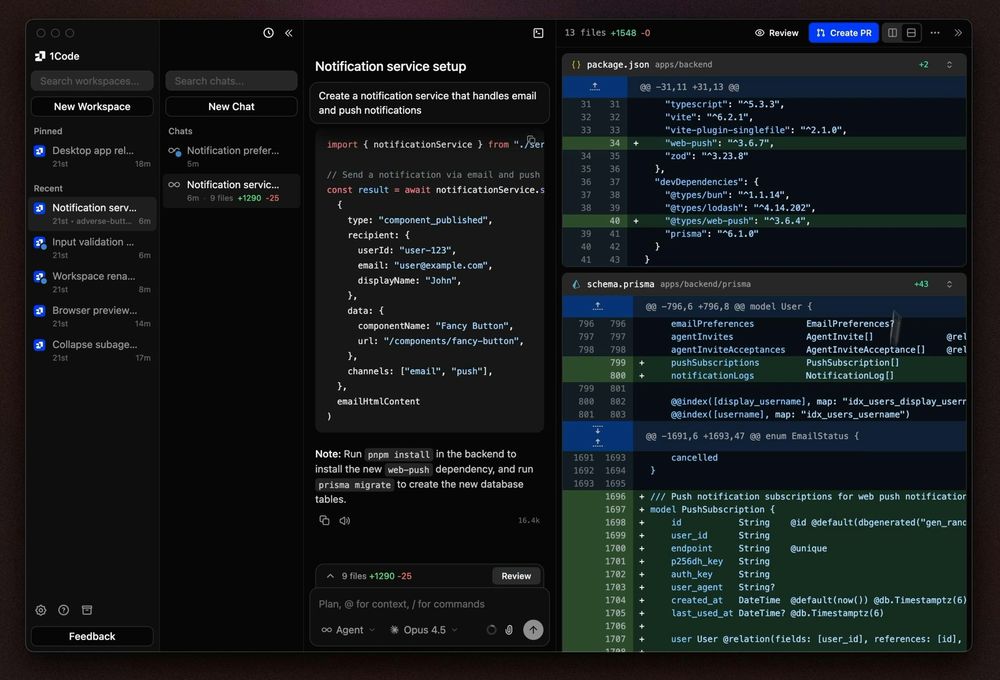
What is 1Code?
How to use 1Code?
Features
Use Cases
FAQ
Pricing
Free Plan
$0/forever
Popular
Pro Plan
$20/month
Max Plan
$200/month
Open source Cursor-like UI for Claude Code
1Code is an open-source client for Claude Code that provides a more intuitive and usable interface with a calm UI design. Backed by Y Combinator, it transforms the Claude Code experience into a visual development environment that supports both web and desktop applications. The platform enables developers to harness Claude's powerful AI capabilities through a streamlined interface designed for productivity and ease of use.
Getting started with 1Code is straightforward and takes just a few steps to begin leveraging AI-powered development.
1. Sign In to Your Account Connect your Anthropic account to 1Code. Note that you will need an active Claude Pro or Max subscription to use the service.
2. Launch Your Agents Run AI agents from either the web interface or the macOS desktop application. You can work on multiple features simultaneously using parallel agents.
3. Develop and Iterate Use the keyboard-first UI to navigate, manage files, and interact with your codebase. The Monaco Editor-powered file viewer provides familiar code editing capabilities.
4. Ship Your Changes When ready, open pull requests and merge changes directly through the interface without switching between different tools or contexts.
Parallel Agents Work simultaneously on multiple features by running agents locally, in worktrees, or in the background, dramatically increasing development throughput.
Full Claude Code Power Access all Claude Code capabilities including plan mode, skills, message editing, and extended context for complex development tasks.
Keyboard-First UI Navigate and manage everything with hotkeys for every action, enabling rapid workflow without mouse dependency.
Monaco Editor File Viewer Browse and view files with the familiar Monaco Editor, complete with theme support and custom context menus.
Quick File Search Find files instantly with Cmd+P dialog that includes recently opened files for rapid discovery.
Plugin System & Marketplace Extend functionality through a plugin ecosystem with MCP authentication support.
MCP Servers Integration Integrate Model Context Protocol servers directly in mentions and sidebar widgets for enhanced AI capabilities.
#1 Parallel Feature Development Run multiple AI agents simultaneously to work on different features of your application at once, significantly reducing development time for complex projects.
#2 Automated Code Reviews Integrate with GitHub to automatically review pull requests, ensuring code quality and consistency across your team's contributions.
#3 Background Development Tasks Launch agents in the background to handle routine development tasks while you focus on more strategic work, improving overall productivity.
#4 CI/CD Pipeline Management Connect with your CI/CD systems to automatically fix failing pipelines and deploy changes without manual intervention.
#5 Project Task Management Integrate with Linear and other project management tools to automatically track progress and manage development tasks.
What is 1Code and how is it different from Claude Code CLI? 1Code is a visual client built on top of Claude Code that provides a more usable interface with parallel agents, a file viewer, and integrations. Unlike the CLI, it offers a graphical experience with keyboard shortcuts and plugin support.
Do I need a Claude subscription to use 1Code? Yes, you need an active Claude Pro or Max subscription from Anthropic to use 1Code. The tool connects to your Anthropic account for AI capabilities.
Is 1Code open source? Yes, 1Code is fully open source. You can access the complete source code and self-host the solution if preferred.
Can I run multiple agents simultaneously? Yes, one of 1Code's key features is parallel agents. You can run multiple agents locally, in worktrees, or in the background to work on different features at the same time.
What operating systems does 1Code support? 1Code currently supports macOS with a native desktop application. Web access is also available for Pro and Max subscribers.